




HoMenace wrote:
I’m about to start listing over a hundred items (Japanese Virtual Boy and NES stuff). Hopefully this time I have better results.
I hope yours all go well (and earn a lot!), HoMenace. Mine went swimmingly. I haven’t even had any communication with my buyer, and it’s already been delivered (presumably intact). Of course, being a new seller, I’m still waiting on my money, but that’s to be expected of a faceless, heartless, self-serving corporation like eBay/PayPal 😉
blitter wrote:
I can’t speak for that ancient version of GCC since I’ve never bothered with it, but the executables for gccVB 4 are prefixed with “v810-” so they don’t interfere with the system version. In any case, the make_v810.sh script installs everything to /opt/gccvb so it’s contained in its own directory, but that’s easily changed by editing the script yourself.There’s a bit of an effort to stabilize gccVB 4 (It’s functional, but has a few outstanding issues) so that’s probably why it’s not in the Tools area yet. If you’re feeling adventurous you can search the forums for the patches and build it yourself…
What are you referring to as “ancient”? The compiler included in VBDE is gcc 4 (See: http://www.planetvb.com/modules/newbb/viewtopic.php?post_id=18197#forumpost18197).
I am also confused about gccVB 4 not being in the Tools section, but the real question is: why isn’t VBDE in there?
HP Lovethrash wrote:
Also has anyone used that cool looking pad that shipped with the CD models? I’ve held one from a used game store but it was broken…so it felt comfy but I dont know how well it actually works. Thanks 🙂
I haven’t used one, but the internals sure look cool:
http://i699.photobucket.com/albums/vv358/gbuczek/null_zpsa9e442f8.jpg
I actually have a few of those vertically-mounted tact switches on hand… hmmm…
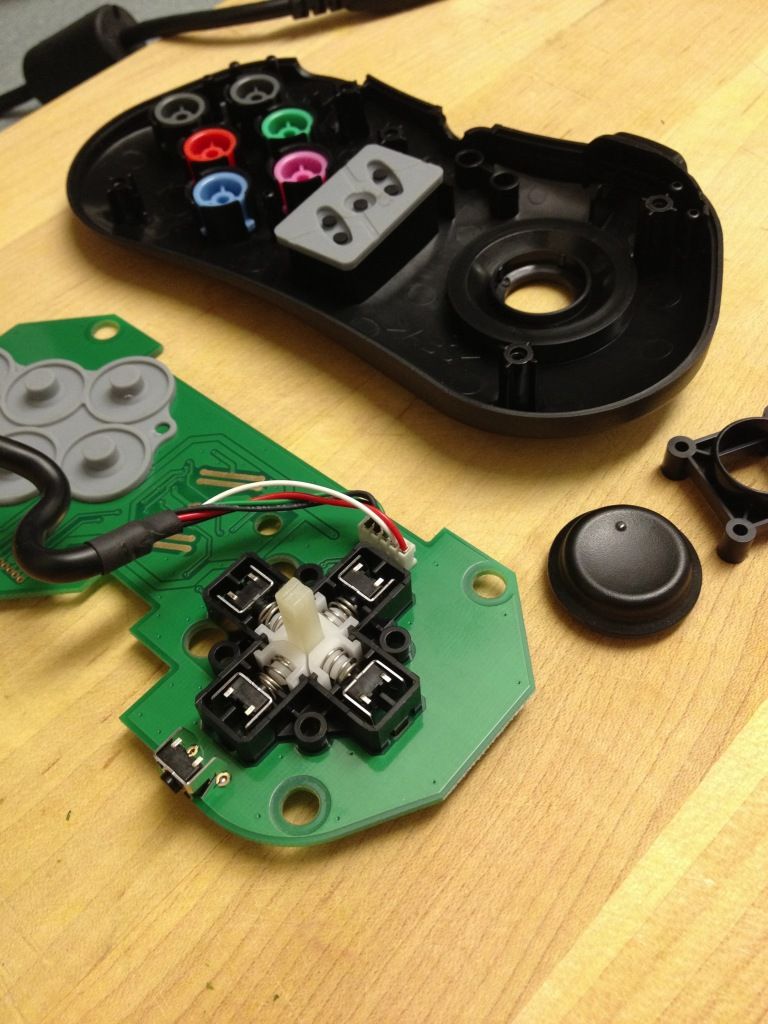
Also, +1 for Metal Slug :thumpup:
@VectrexRoli: Well, I didn’t mean that you should redo the VB video; your current one is more than adequate. I just meant if you do an introduction for any other “obscure” game system, you might want to spice it up a bit. Also, it might help others understand the information better if they can see someone as inexperienced as themselves learning to use it (whatever “it” is). I can imagine how much work it is to make a video, though (which is why my channel has been “video-free” since I signed up for YouTube :-P) Anyway, just keep making videos however you want to, and I’ll keep watching them 🙂
Thanks for posting another well-made, informative video, Roli! It definitely has my “like” 😉
Suggestion: for your next “introduction” video, you could explain the system/peripheral to someone (Mrs. VectrexRoli, Postman Walter, Julia, whoever) instead of talking directly to the viewer/camera (in fact, you could even make it a POV, where you are the camera). It wouldn’t have to be a full-blown “funny sketch video”, but it might be a little more interesting (not that your other intros are boring, or anything).
I just listed something (shameless plug! ;-)), so I’ll soon have another data point to add to this discussion.
@Dave_: Thanks for mentioning that buyer requirements thing!
(Note about the item: it says I only ship to USA, but if any overseas member here wants it, I’ll gladly ship it to you; just contact me through eBay, PVB, or email to make arrangements.)
-
This reply was modified 12 years ago by RunnerPack.
Is there any possibility that those of us with some soldering skill could modify our older FB+ to alleviate some of the connection issues? Maybe if you explain what the problem is, we could come up with something ourselves. Unless, of course, it would require a firmware update, or something (which is still doable, but probably not very practical).
Also, Re: the through-hole vs. SMT USB connectors: My last two cellphones have had micro-b ports. My current one alone has been cycled much more than my FB+ has, and I even use my phone a lot while it’s plugged in. Neither phone even shows signs of loosening, much less coming off of the board.
I think it mainly comes down to the quality of the parts you use, and making sure they’re soldered properly. There’s also the “human factor” of how roughly people handle them. I’d say that, 99 times out of 100, FB+ owners are probably going to treat their carts and cables with better-than-average care.
I fully understand and accept your decision, but you may still want to prepare for the day when TH mini-b’s vanish from the market altogether…
The Mini-B connectors have pretty bad longevity, so it’s not really surprising that yours is starting to go. As a stop-gap, you could try to carefully bend those three little tabs in a little with some kind of pointy instrument. That should make it squeeze the plug a little tighter (until they bend back out…)
@Minestorm: I don’t know how many FB+ parts you have left in stock, but I suggest you migrate to Micro-B connectors if you ever do a board revision (not to mention any future USB devices you do).
For the existing install-base, it may be possible to upgrade to Micro-B connectors. The problem is that it’s a through-hole connector. I’m not positive that through-hole Micro-B connectors don’t exist, but my gut feeling is that they don’t. Besides being more durable, the other main point of the Micro-B is that it’s thinner than the Mini-B.
It would be fiddly work, but one could possibly remove the Mini-B and “dead-bug” a Micro-B in its place, using fine wire to connect it to the board. Maybe I’ll get some Micro-Bs and try it on mine (if I can be reasonably sure I won’t kill it in the process).
It sounds like it had the “crease problem”, where the strain relief comes loose, and that allows the cable to bend repeatedly at the edge of the conductive glue. I’ve soldered cables with only a few wires below the crease still attached, although the cable itself was still on (because I replaced the strain-relief before working on it).
I’ve also repaired a few with removed cables, but they were not creased, so they still had enough length to “stick” back on long enough to be soldered.
I’ve never attempted any with both problems at once, but I’d like to see some detailed photos of yours. It may still be possible to reattach the cable. TheForce81 might be willing to give it a try, too.
You could also look for glitchy ones on eBay. A while ago, someone had a few for $20 each, plus postage. I don’t remember if he ships outside the US, but if not, I’m sure someone on the forum would be willing to act as a “proxy”. If you want it fixed, too, you could have it sent to me, and I could fix it and send it on (which I’ve also done before, for a user in the UK).
BTW, there is no difference between “right” and “left”. They are all interchangeable (although there seem to be two “styles”: American and Japanese).
If you don’t mind the Mono framework, you could use Mono Paint (Paint.NET ported to Linux). There’s also The GIMP.
It looks pretty cool, but it lacks the grid of pixels that make it easier to adjust the focus, and two of the corners aren’t as visible, which might make it harder to adjust IPD.
1. You don’t really need a special VB AC adapter, per se. I had my first VB for quite a while before I got one, and I made do with some random adapter of the right voltage and a set of alligator-clip jumper wires. If you’re handy, you can probably “MacGuyver” something up 😉 The VB can use anything from about 6 to 10 VDC, and only draws around 500 mA or so (possibly less). Looking at the back of the controller with the battery box removed, the right-hand terminal is positive, and the left one is negative.
2. It’s possible that your display problems are, as you say, related to the dropping voltage of your batteries, but it’s more likely that the display cables are coming unglued, as they all eventually do. I am among those who can permanently fix this problem. I’ll send you a Private Message and we can discuss it.
3. The cartridges themselves are responsible for saving. It seems you simply got two cartridges that both happen to have dead batteries. They can be replaced, though. I’ve never done it, myself, but I’d be willing to try, given the proper parts.
cr1901 wrote:
[…] my […] hard drive […] decided to go kaput, and I cannot reliably boot into it. […] There is a possibility that I’ll be going back to Unix full time.
[…]
Fun while it lasted, but this is beyond my control :/.
I don’t get it… are you trying to say that Windows ruined your HDD? If you’re going to get a new drive to install Linux on, can you not just as easily reinstall Windows (and the VB dev tools) to it, as well? None of this sounds “beyond your control” to me, so I must be missing something.
Should have told the manager about a certain guy you know who’s handy with a soldering iron… 😉
BTW, nice “unintentional selfie” in the infinity mirror 😀
Sorry to hear about your health issue (get well soon!) but even if you were well, it’s no big deal that you haven’t had time to send them. Although, it seems like that good-for-nothin’ husband of yours could take them to the P.O. for you, especially since (IIRC) they’re already packed up 😉
Yours are in a slightly different boat than these were, but I think they have at least some chance of pulling through. Maybe it would be a good idea to post “before and after” photos in the VG thread to let people know just how close to the brink these things can come and still be brought back to full, working order. We might save some VBs that are assumed to be “unfixable” by their owners.
DogP wrote:
(I’d want it all to fit inside a standard sized cart).
This is not a requirement for me, personally. Look at the official development carts for SNES, GB, Jaguar… even the VB: usually giant, bare PCBs covered with socketed DIPs and sprouting ribbon cables. Sometimes there’s half a case to make it line up with the cart slot.
As long as it’s not so heavy it tries to unplug itself or snap a connector off, I’m fine with any of the above.
Since Brennan seems to have given up on this, someone may want to adapt this to the VB:
http://hackaday.io/project/1507-USB-MegaDrive-DevKit
Like the VBoot, it’s a cart based on an FPGA with an SD slot, but it also includes a USB port to allow runtime debugging using GDB. Another distinctive feature is its use of SDRAM, instead of SRAM, to emulate the ROM, which should be much cheaper. In fact, he claims one of these can be built for $40 (although that probably assumes you already have the JTAG programmer, etc.).
Obviously, the firmware will have to be ported to/rewritten for the NVC in VB, but that shouldn’t be too hard.
(BTW, Brennan, if I’m wrong, please do speak up and let us know!)
cr1901 wrote:
Part of what bothers me re: using emulation as a hardware replacement (i.e. Hardware with a CPU/OS kernel solely dedicated to console emulation) is that consumers WILL most probably stumble upon behavior that’s not consistent with the real hardware. That breaks the immersion and authenticity of the experience of the consoles being brought back from the dead.The only emulator I’m aware of so far that can justifiably advertise itself as cycle-accurate is higan (the SNES portion specifically). In short, I wish there wasn’t a market for these types of products until more consoles are emulated to the cycle-accurate level.
I guess it’s the pragmatist in me, but cycle-/pixel-/whatever-accuracy has never even been on my list when looking for an emulator. The way I see it, the point is to play games. If you can play the game that the original authors of the game envisioned, and do 99+% of the stuff they put in said game, that’s as accurate as it needs to be.
If you’re noticing that the colors are off by half a shade, or the background layer scrolls one pixel too far to the right in the 3rd level, are you actually having fun playing the game?
In some cases, the designers ran up against the limitations of the hardware (see: NES sprites-per-line limit). Thanks to emulation, some of those limitations can be lifted, and you can actually get closer to the game they envisioned, by being less accurate (and probably enjoy the game more, besides).
That’s not to say that perfect preservation isn’t a lofty goal, it’s just not all that important when it comes right down to it (especially if the information required to achieve that accuracy is available for reference by future generations).
Well, it turns out I can reattach cables that have been peeled off their VB displays – if they’re carefully reheated and stuck back on – but it’s certainly not something I want to do again, unless it’s absolutely necessary.
So, if you’re contemplating doing the solder repair, or having it done, DO NOT mess with the cable or PCB in any way (unless you’re instructed to do so by your service provider)!
cr1901 wrote:
Re: the Retron5… well, from what I understand, it doesn’t actually READ the cartridge in real time, but compares the cart checksum to an internal database.
…
Retrode has a similar principle, but that has no delusions in being a 5-in-one hardware console.
I’m fairly certain the Retrode actually reads the ROM and reads/writes the SRAM in the carts, presenting them as files in an emulated mass storage device. In fact, someone made an adapter for the Genesis slot to read/write VB carts.
Anyway, my two cents about the Retro5 (and its ilk) is that, you might as well keep your carts sealed/stored/displayed/whatever, and use emulation, which is a lot cheaper (essentially free). No matter what any license agreement or copyright law says, there’s nothing morally wrong with playing a game you own without using the actual cartridge it came in.
Emulators can even make your HD LED TV look like a crunchy, old NTSC (Never The Same Color ;-)) CRT, for that authentic nostalgia experience (except you don’t have to take the ROM file out and blow on it a few times ;-))