




Tauwasser wrote:
Nice advertising the projector as being one in only two known to man when it says “Projector №12” on one of his photos.
Actually, he says it’s one of two “known to exist”, which implies that he’s talking about the ones in the hands of private collectors, but you do have a point (as does DaVince; about loss and destruction).
Besides, if you want to get technical, there’s been at least one made by an individual (DogP) which even has a few more features, so this really isn’t that impressive (although still quite interesting, especially as a collectible, don’t get me wrong). I think he’s asking a ridiculously too-high price, though. I think he’s just trying to get the highest “Make an Offer” he can, and I don’t blame him.
VirtualChris wrote:
Thanks for the link. What I’m also looking for is a code sample so I can get started. What I want to do is make a game using the DK Bongos since there weren’t many made. The idea I had in mind is a Space Invaders-style game, only using bananas instead of aliens and a bongos-shaped ship. It seems like this should be do-able, except the section on the DK Bongos doesn’t really mention anything about the clap sensor.by the way, today (the 26th) is my two-year anniversary on the site.
Actually, right at the bottom, it says the microphone returns its value as if it was the right analog trigger. Or did you mean you’re not sure how to interpret this value? I would assume that it’s just a simple amplitude measurement (or can be treated like one), which would probably only require a simple threshold activation.
I assume your plan was for the bongos to move left/right and clapping would fire the gun, right? You’re right; it definitely sounds doable (and probably pretty fun!)
Before reading that doc, I didn’t know the bongos were each divided into two sections. Gonna make it a bit harder if I decide to try making my own…
BTW, happy 2nd anniversary! My 7th is coming up in July, three days after my b. day 🙂
If you just want documentation, this looks pretty good: http://hitmen.c02.at/files/yagcd/yagcd/index.html
I don’t know of any development communities, but you could try looking for a “#gcdev” (or similar) on various IRC networks. I would start with Freenode and EFnet.
Also, since I too am a bit interested in this topic, we could use this thread to start a mini-community 😀
While we’re on the subject, does anyone know the easiest, cheapest way to run GC homebrew on hardware? I’ve always wanted to try SDload, but I could never find the required Action Replay for a good price. Does anyone have an NTSC/U one collecting dust that they would part with for, say, under US$20? An SD card adapter would save me some trouble, if you have one 😉
That would be epic if Mednafen could be ported… Especially since you get Wii compatibility for free!
Hedgetrimmer wrote:
Feck thats a lot of cash for a non 3D experience on a PAL only tv, which is great for me from UK, but i doubt I’ll be making a bid.
Actually, if it’s a real “Video Adapter VUE”, it should have a red/green anaglyph mode (see the attached screen-shot of Red Alarm projected on a large screen at some expo). Perhaps that mode only works with the RGB cable he can’t get to work.
Also, it looks like he has a dev cart (auction has a screen-shot of the “Sample Soft” demo with the monkey and banana-pillar). It’s not included, but for that price it should come with at least one! 😛
Attachments:

And the award for whiny, selfish juvenile of the year goes to…
I’ve noticed another caveat with this version: it’s much more strict about the syntax of in-line assembly blocks. Namely, the endings have to be right. Something like this:
asm(
  "jr foo%="
  "bar%=:"
   "ld.b 0[%0],r10"
   "foo%=:"
   : /* Output */
   : "r" (r10) /* Input */
   : "r10" /* clobbered */
);
…used to work. Now you need something like:
asm(
  "jr foo%=;"
  "bar%=:\\n\\t"
   "ld.b 0[%0],r10;"
   "foo%=:\\n\\t"
   : /* Output */
   : "r" (r10) /* Input */
   : "r10" /* Clobbered */
);
The thing to notice is the “;” or “\n\t” at the end of every statement line (which are interchangeable, I just used those for aesthetics). Just something to keep in mind when porting older code or writing new.
That’s not technically “working”, HorvatM… But, if you clear the “auto login” setting, Opera’s magic wand (or the IE/FF equivalent) continues to be a nice workaround to the lack of proper auto-login.
@KR155E: I’m sure you have your reasons, but I can’t see what’s wrong with just staying logged in all the time… Just about every other forum I frequent does it that way. What’s the difference between that and auto-login? They’re both cookies, right? What about lengthening the “logged in” timeout to something like 24 hours?
DaVince wrote:
I’ll try experimenting with the settings, though I’m not sure where to do that in Mednafen.
I posted some configuration info here.
I’ll also try the pulfrich ones now that I’m not confused about “they won’t just work”, lol.
Just to be clear: I wasn’t asking if you had used them in Mednafen. They really “just won’t work” for VB emulation, as I’ve said. I just wondered if you had used them for anything, e.g. Jim Power, Orb-3D, or some other 3-D source (just do a search for Pulfrich on e.g. YouTube or something).
I’m posting this here as a stopgap until the documentation is updated:
All of the VB-related command-line/config-file arguments start with “vb.” e.g. “-vb.3dmode
anaglyph
cscope
sidebyside
pbarrier
In anaglyph mode, there are color presets. Pick one with -vb.anaglyph.preset Where
disabled
red_blue
red_cyan
red_electriccyan
red_green
green_magenta
yellow_blue
If none of the presets work well with your glasses, you can control the brightest color used for each eye with the -vb.anaglyph.lcolor and -vb.anaglyph.rcolor options (be sure to set “preset” to “disabled”). Each option takes an RGB triplet in 0xRRGGBB notation. The three shades for each eye are calculated from these colors.
The other VB-specific options are either self-explanatory or equivalent/similar to the other systems.
(Note: don’t use a leading dash when entering the options into the config file.)
(I assume you know to check for the hum of the scanner, and there isn’t one.)
You should check the connector on the controller to see if power is getting that far (making sure the switch is on, of course). Here is the pinout:
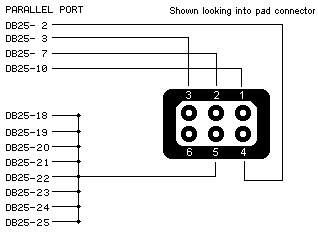
1. Data out
2. +5VDC (From VB)
3. Latch
4. Clock
5. GND
6. Battery/Tap voltage (+6-13VDC)
I fear that it may be the internal regulator board (it seems to be a fairly common cause of dead VBs). If so, it will have to be replaced; a somewhat involved procedure. See these two threads for more info.
I’m glad you like it. Since it still needs some work, I may update it (and this thread) in the future, so be sure to check back before you use it.
I’d like to see how you do use it, if ever, so don’t be a stranger 😉
In fact, let us know about anything else VB-related you do, whether my font’s involved or not 😀
I’m too lazy busy 😉 to check out your article (I still might…) but I took a look at the font you substituted and it’s not a bad match.
Yeah, it does kind of make your eyes feel weird after a while, but you can get used to it. It might be worth trying to tune the colors using the emulator’s controls (Reality Boy and Mednafen both have pretty good anaglyph adjustment settings). There’s only so much you can do, since your monitor doesn’t have a setting for the wavelengths it produces (how cool would that be?) but if you can get a good brightness and gamma balance between your eyes, it can get much easier to play for longer periods.
If you want to experiment with other anaglyph combos (like Green/Magenta), try to get your hands on some Roscolux (or equivalent) lighting filters. I requested a set of samples online and didn’t even have to pay for shipping.
I’ve found that a stack of #389 “Chroma Green” and #89 “Moss Green” for the left eye and #46 “Magenta” for the right eye, combined with (100%, 75%, 50%) RGB settings for the display is pretty good (on my monitor) if a little dark. I’m still experimenting, though, so other filters/settings might work better (especially given the wide range of monitors out there).
Have you tried your Pulfrich glasses at all?
Karnalg wrote:
…the right speaker of the console does not work. 🙁
That’s probably a pretty easy fix, and headphones are a workaround… assuming the package is priced to compensate (haven’t looked at the site). If it isn’t, one could always try to haggle 😉
I still have yet to even play either of those games, though I’ve always wanted to. I do have two scans from GameInformer and one from GamePro, though (200dpi BMPs; some stitching required).
I would prefer not to email them, but if you get mIRC (or something DCC compatible) and come in to the IRC channel (EFnet/#virtualboy) I can send them directly to you. Or, if you don’t mind some lossy compression, I could probably make them small enough to email. Send me a PM and we can discuss it.
Deadly-D wrote (and RunnerPack punctuated ;-)):
“Recently Replied Topics” sounds fine, KR155E. RunnerPack is just suggesting that you change it to something that sounds better. Kinda like how “Ghost Grabbers” doesn’t sound as good as “Ghost Busters” lol. I would hate to see “Recently Replied Topics” go, actually.
That’s pretty much what I meant. Sorry if I confused you, KR155E! 😀
Another suggestion: “Recently Replied Topics” doesn’t exactly roll off the tongue… Some ideas (caution: machine translation! ;-)):
1. Hot Topics
Wichtige Themen (Probably not the right meaning of “hot”)
2. Popular Topics
Beliebte Themen
3. Recent Discussion
Den letzten Diskussion
4. Recent Replies
Den letzten Antworten
5. Most Recent Replies
Die neuesten Antworten
6. Latest Replies
Neueste Antworten
I’m not sure I’ve said it before, but it bears a public statement, regardless:
Thank you for adding VB support to Mednafen! It totally rocks!
😀
DaVince wrote:
Whoa, thanks for all that info. That was very informative.
You’re welcome. That is why the forum’s here, right? 😉
Another little interesting fact… I just noticed the glasses I have now list some TV stations. Guess it’s from an age when they attempted 3D TV and it didn’t quite work out well yet!
I live in the Netherlands, by the way.
Now I’m 99.85047% convinced that these are Pulfrich glasses. Look at the paragraph under “Examples” in this section of the Wikipedia article on the Pulfrich effect.
You can’t use them for VB, but you could play Orb-3D or Jim Power: The Lost Dimension in 3-D… in 3-D 😀
Well, I thought you were talking about polarized glasses, until you said “dark and light plastic”. If there’s one dark lens and one clear, those are called “Pulfrich” glasses and they won’t work for VB (except maybe on the Wario Land title screen).
If they are polarized, you’ll need two projectors and another pair of matching polarized lenses (there are two kinds of polarized glasses: linear and circular). There’s also a way to use a single projector or even a standard CRT monitor, but even if you could find the special active LC polarity filter, it would probably cost more than the dual-projector setup. I can understand why you didn’t find them (or even look) since you didn’t know what they’re called, but there are a few posts about a dual-projector, polarized 3-D setup (a recent one is here).
If you just want to play VB in 3-D on your current PC/monitor, you basically have three options:
1. Anaglyph glasses (you can find them for free + P&H if you live in the U.S., or get them from a magazine or TV promotional giveaway). I would suggest magenta+green if you can find some (they’re including them in some 3-D DVDs, like “Journey to the Center of the Earth”) or the standard red+blue or red+cyan ones they use for printed matter. I thought those new Yellow+blue ones would be better, but they kinda make my eyes feel weird if the picture isn’t a bright, full-color one, which is what they’re designed for and which VB games definitely ain’t.
2. the active LC shutter glasses you mentioned (they can be cheaper than the ones for those new TVs, if you can find them, or about the same price if you get the new nvidia ones). They might not work with your LCD monitor, though. And even if you have a CRT, the refresh rate might give you problems, but not on anything approaching “recent”.
3. Auto-stereo. That’s where you just manually merge the images of a stereo pair that are side-by-side on-screen. I wouldn’t recommend it for extended viewing, though.
It will indeed be very nice when/if you figure out the “latest unread” part, but I like it already! It did kinda throw me when I saw all the posts I’ve already read with no “Re:” on them, though 😀 I’ve been thinking of suggesting this very thing, but I thought it would take too much hacking. Glad to see I was mistaken 😉
A couple of suggestions:
1. What about putting the post number (either relative to the thread, or to the entire board) along with the thread title? It would make it a little easier to manually keep track of which posts one has read.
2. How about a link to the first post, so older threads can be easily re-read in their entirety?